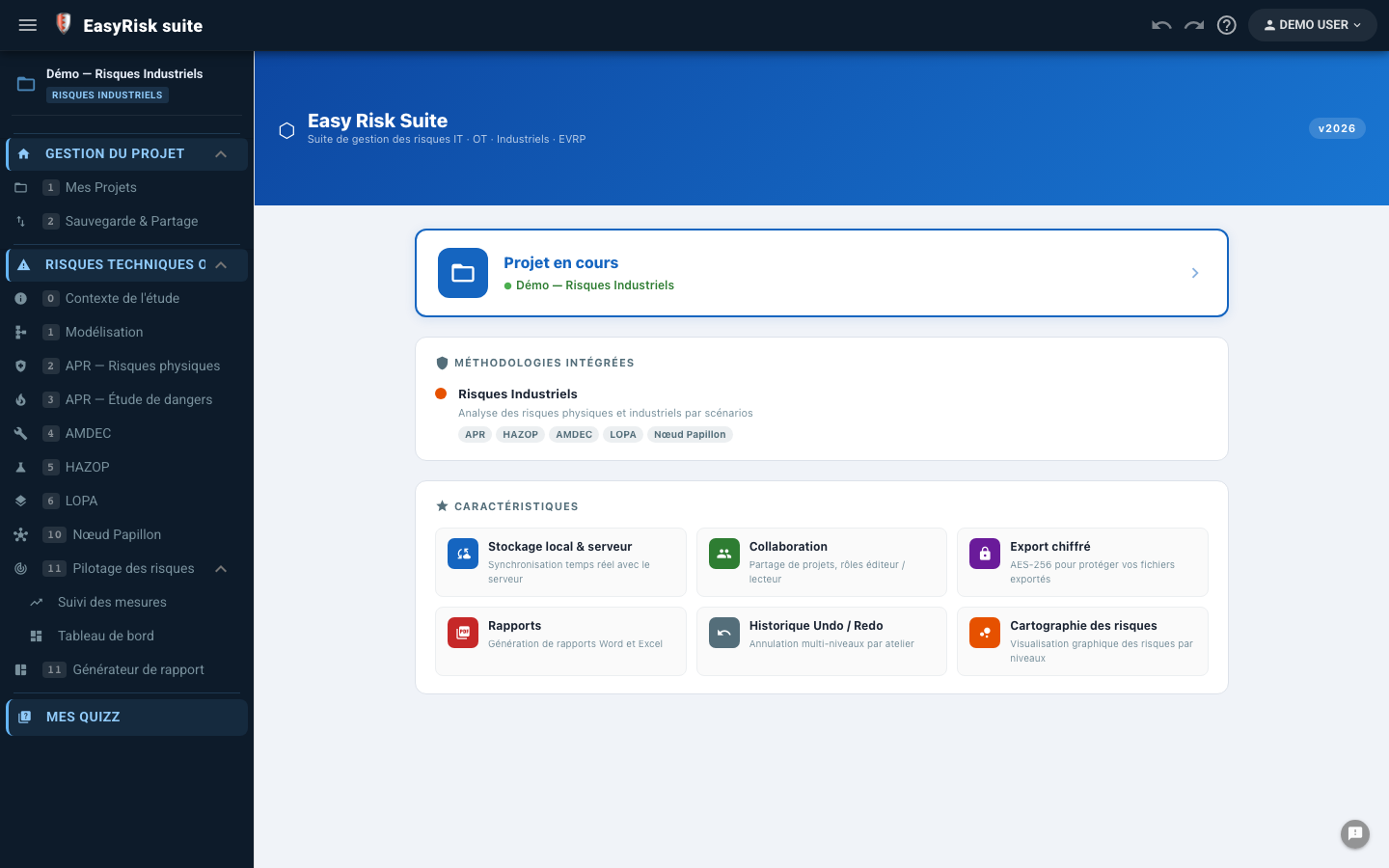
⚠ Industrial Risk Module · Technical Overview

Analyze your industrial risks
10× faster with AI

Polyodos IR covers the full risk-analysis lifecycle—PHA, FMEA, HAZOP, LOPA, Bow-Tie, and Fault Tree—in an integrated, collaborative, AI-assisted tool.

Real-time multi-user sync Offline-first Export Word & Excel Built-in generative AI
7
Analysis methods
2
Bow-Tie modes
IA
Automatic scenario generation
1-clic
Complete Word report
SEVESO
Conforme PIGC / EDD

An integrated tool, from context to reporting

Every step of an industrial-risk study in one linear workflow, with no data re-entry between methods.

📋

Context & scope

Study organization, team, applicable regulations, and selected methods.

🏭

Facility modelling

System / function / component / variable hierarchy—a common reference for all methods.

⚠️

Five analysis methods

PHA (physical + safety report), FMEA, HAZOP, and LOPA—each method reuses the model.

🦋

Bow-Tie

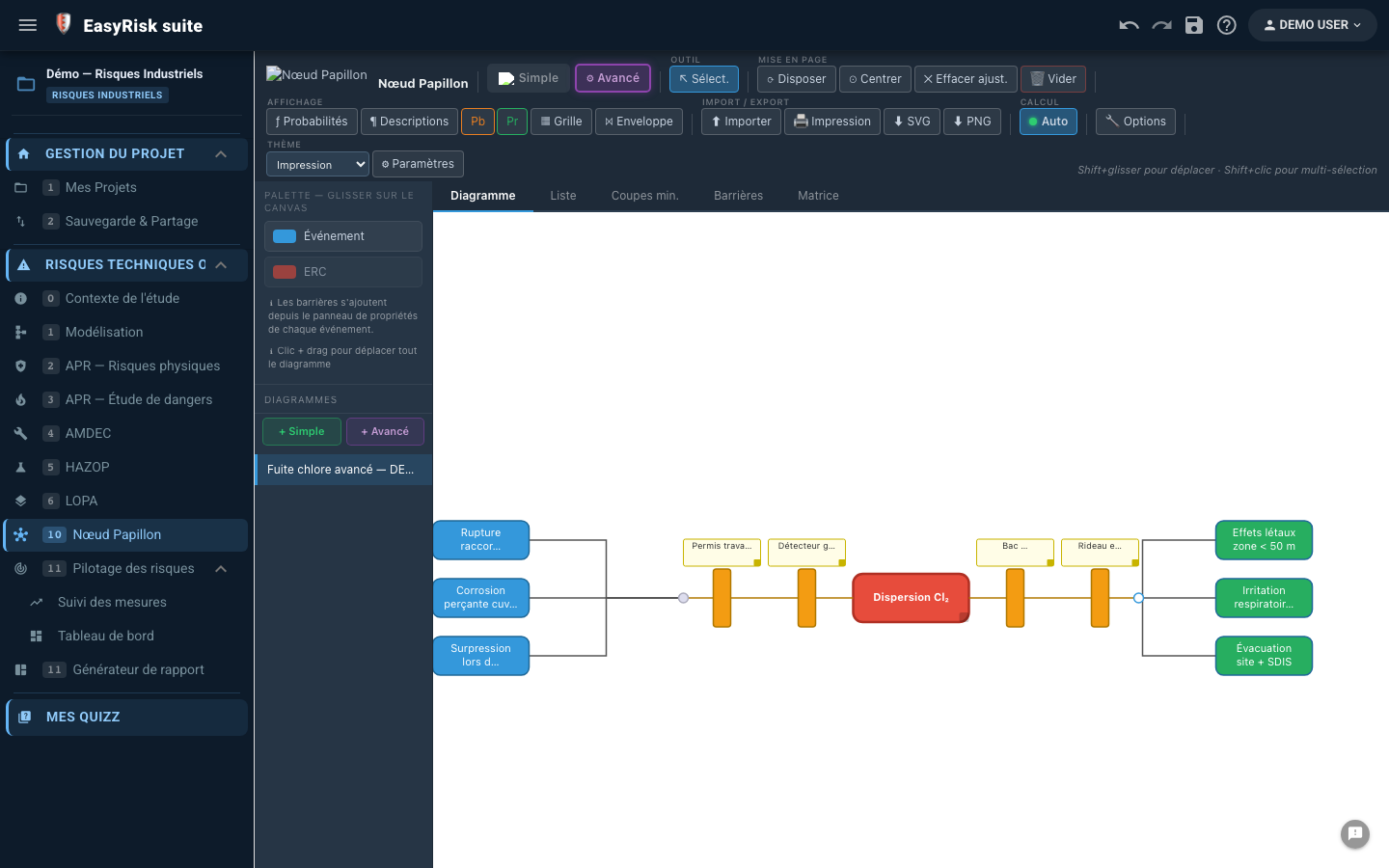
Simple (visual barriers) or Advanced (probabilities, MOCUS minimal cut sets, PHA/safety-report import).

🌲

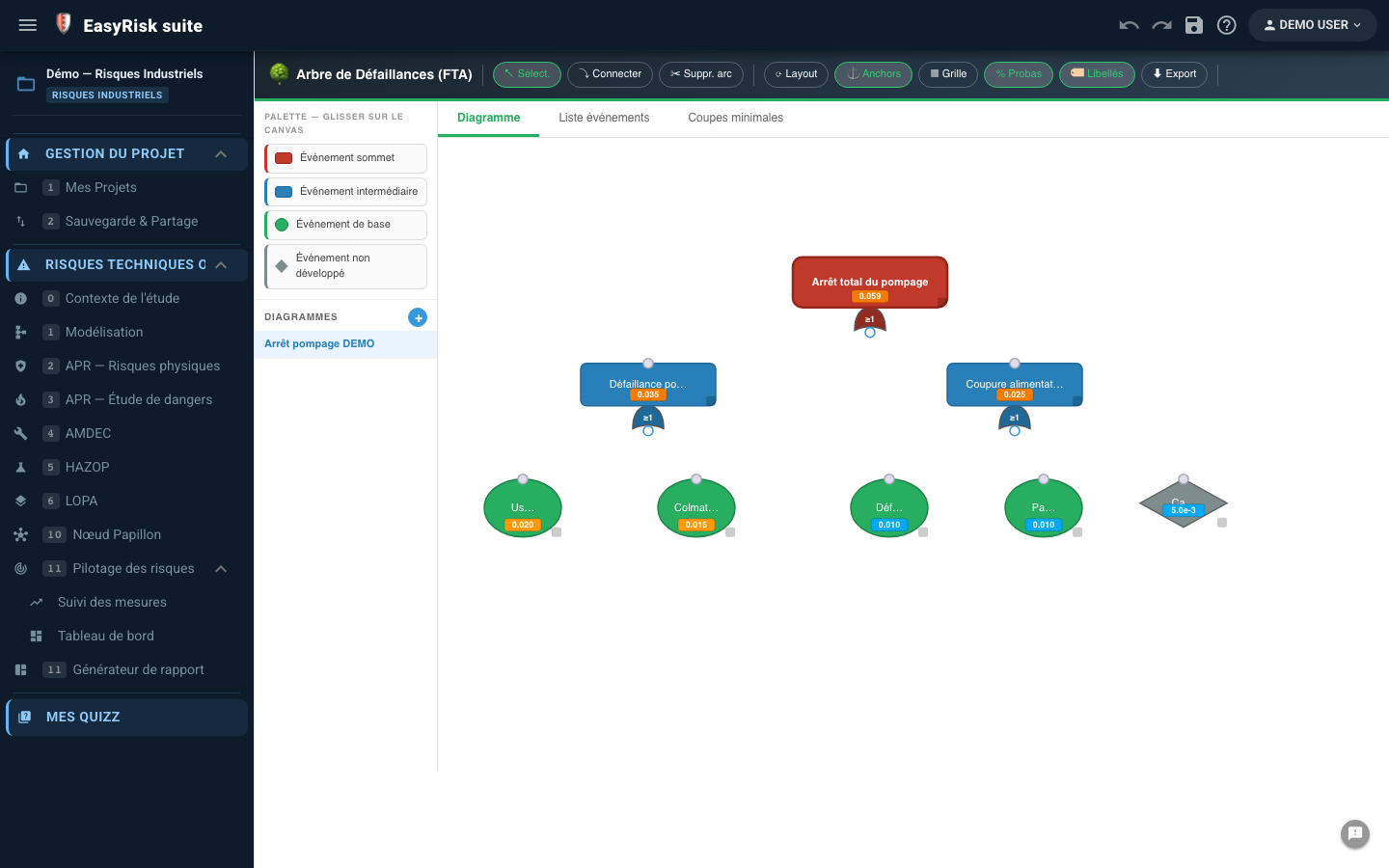
Fault tree analysis

Graphical construction, AND/OR gates, and top-event probability calculation.

📄

Automatic Word report

Markdown sections with tokens—one-click generation and configurable styles.

🤖

Assistant IA

Choose from eight engines, including a local model through Ollama—to generate risk scenarios from your model.

🎓

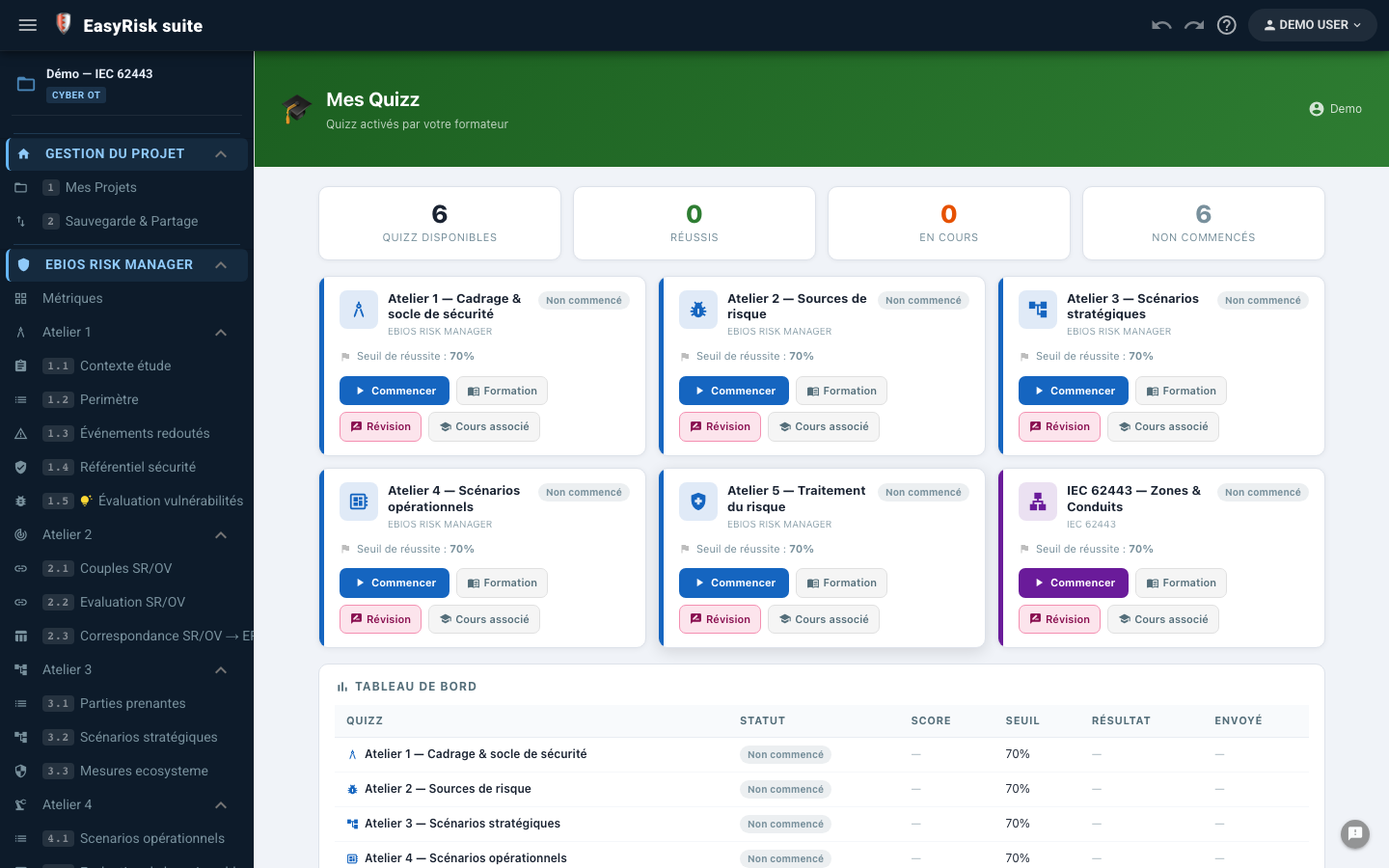
Built-in training

Regulatory quizzes, trainer mode, and progress tracking—with no external tool.


Every analysis step

Each page corresponds to a step in the analysis workflow. Data flows automatically from one page to the next.

0

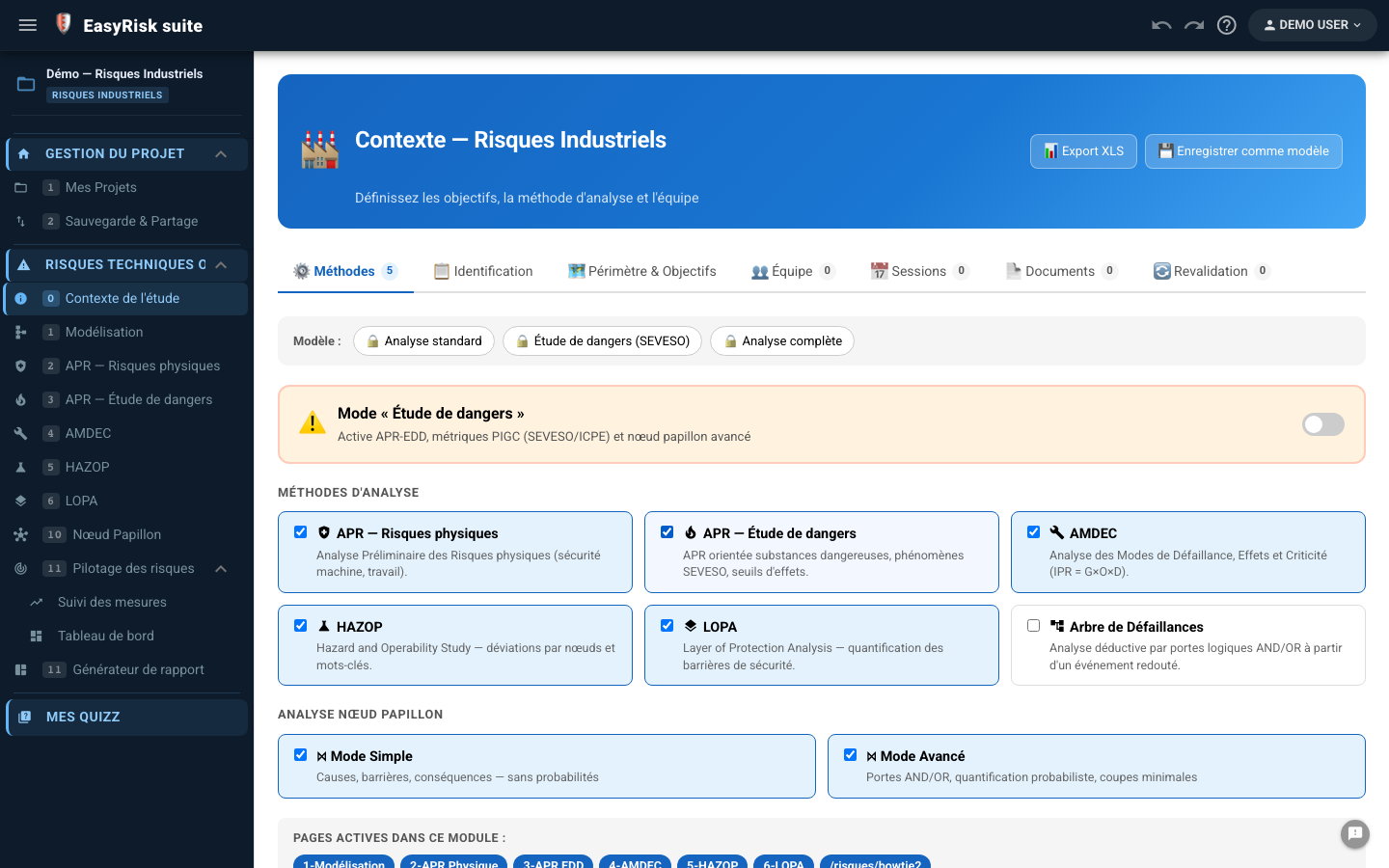
Study context (ContexteRI)

Complete study scoping before any analysis—administrative information, scope, regulations, and team.

  • Study identification Title, facility, organization, owner, reference, version, and start/end dates.
  • Functional & geographical scope Free-text description of the study boundaries and explicit exclusions.
  • Applicable regulations Free-text field + list of standards (SEVESO, ATEX, ISO 31000…).
  • Working assumptions Structured text—automatically included in the report.
  • Method selection Select PHA, FMEA, HAZOP, LOPA, or Bow-Tie to enable or disable the corresponding menu pages.
  • Safety-report mode (SEVESO) Enables the fixed PIGC scales and regulatory thresholds across all methods.
  • Team composition List of members and roles—included on the report cover page.
SEVESO / PIGC ISO 31000 Export Word
Context page—scoping form, method selection, team
1

Facility modelling

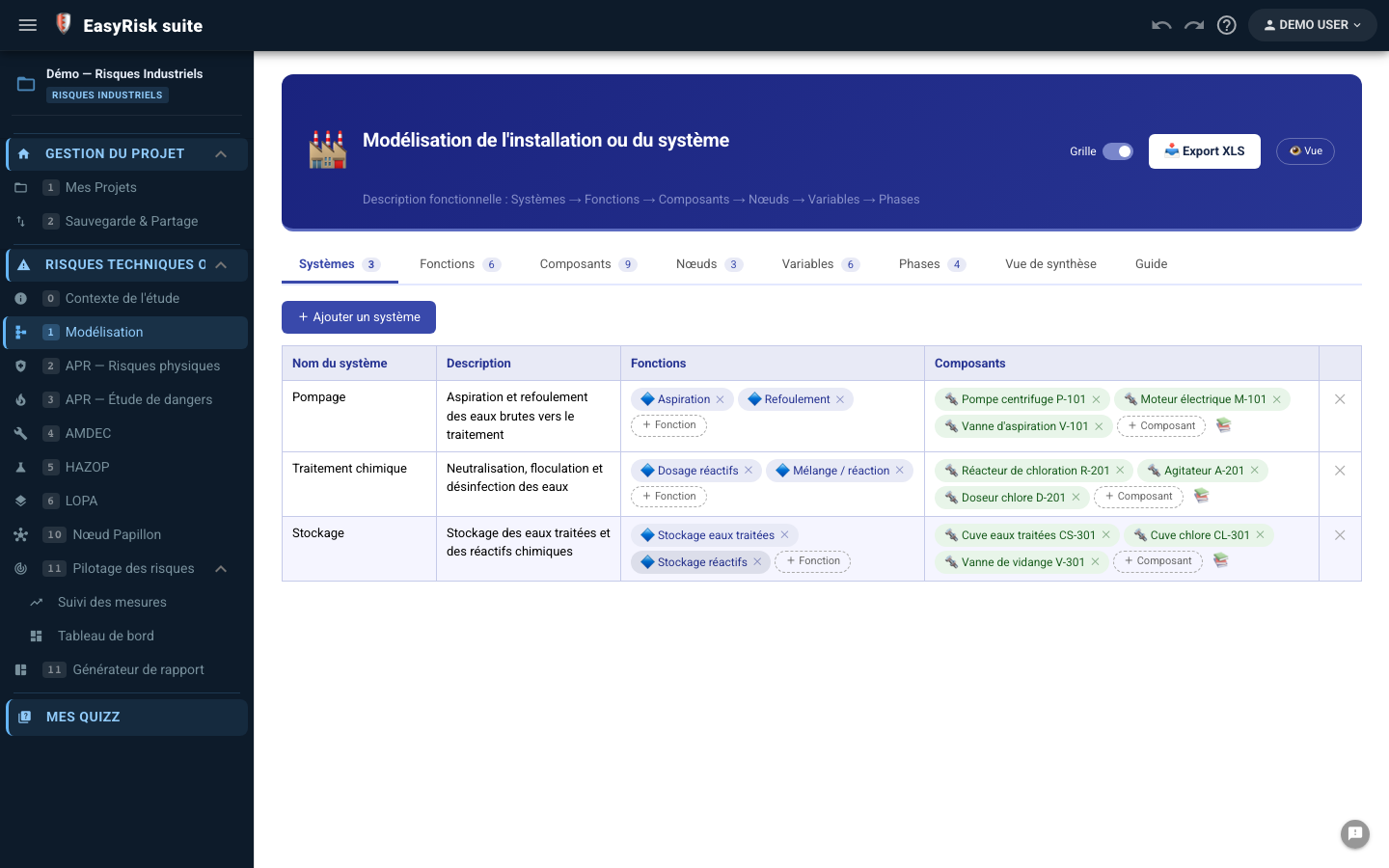
Four-level hierarchy—systems, functions, components, and process variables—a common reference for all methods.

  • Four hierarchy levels Systems → Functions → Components → Variables (flow, temperature, pressure…).
  • Automatic reuse Systems and components appear as selectors in PHA, FMEA, HAZOP, and LOPA—with no re-entry.
  • Vue tableau + vue arbre Visual navigation through the facility hierarchy.
  • Import IA Describe the facility in natural language—AI suggests an initial hierarchy for validation.
  • Structured Excel export Complete exportable tree (exportModelisationXLS.js).
Shared reference data IA import Export Excel
Facility modelling—system/function/component hierarchy
2

PHA—Preliminary Hazard Analysis for physical risks

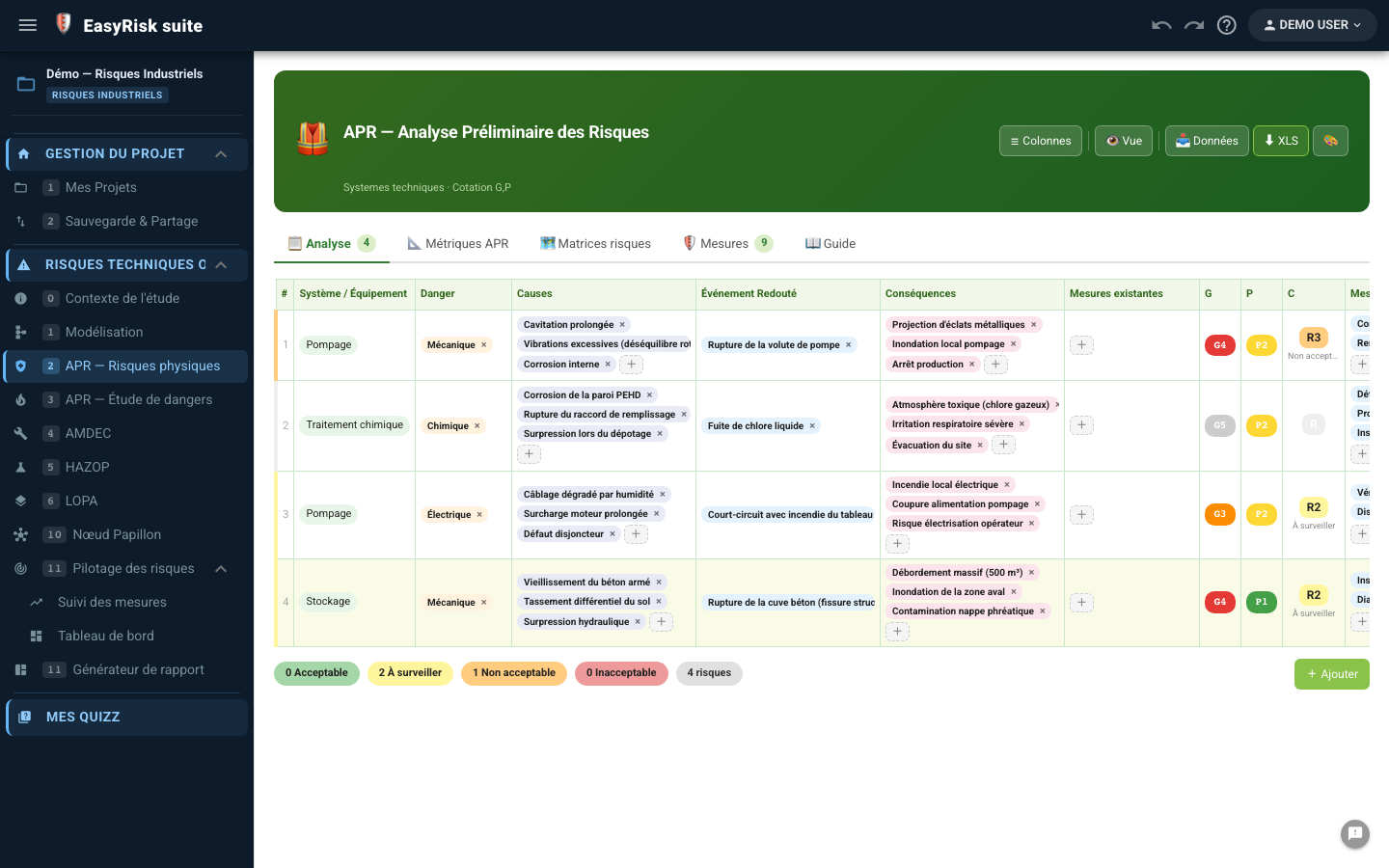
Identification of risk scenarios by system/equipment, with initial and residual ratings.

  • Structured table System, equipment, hazard, feared event, causes, and consequences.
  • Double cotation G/V Initial Severity × Likelihood plus residual ratings after preventive measures.
  • Dynamic risk matrix Immediate visualization of scenario positions (Critical / Unacceptable / Monitor / Acceptable).
  • Preventive measures Structured field linked to the overall action plan.
  • AI generation AI suggests PHA scenarios from the facility model—for review and completion.
  • Filters and sorting By system, risk status, and criticality—to prioritize reviews.
  • Unlimited undo/redo Complete change history.
Cotation G×V AI scenarios Export Word + Excel Undo/Redo
Import BowTie : Any PHA scenario can be imported into the advanced Bow-Tie diagram in one click (causes → barriers → consequences).
Physical PHA—scenario table, initial/residual S×L rating, risk matrix
3

PHA—Safety Report (SEVESO)

Specialized PHA for SEVESO facilities—fixed regulatory PIGC scales, hazardous phenomena, and passive/active risk-reduction measures.

  • Fixed PIGC scales Severity and probability comply with SEVESO regulatory scales—and cannot be changed, ensuring compliance.
  • Hazardous phenomenon + top event Dedicated columns for the initiating event, hazardous phenomenon, and top event.
  • Passive and active risk-reduction measures Separate risk-reduction measures—passive (physical barriers) and active (instrumented barriers).
  • Matrice SEVESO Graphical positioning on the regulatory matrix (Unacceptable / Control required / ALARP / Acceptable).
  • Lien LOPA Safety-report scenarios with active risk-reduction measures can be sent to LOPA for quantification.
  • Advanced Bow-Tie import Top event → central event in the diagram; risk-reduction measures → barriers with a passive/active type.
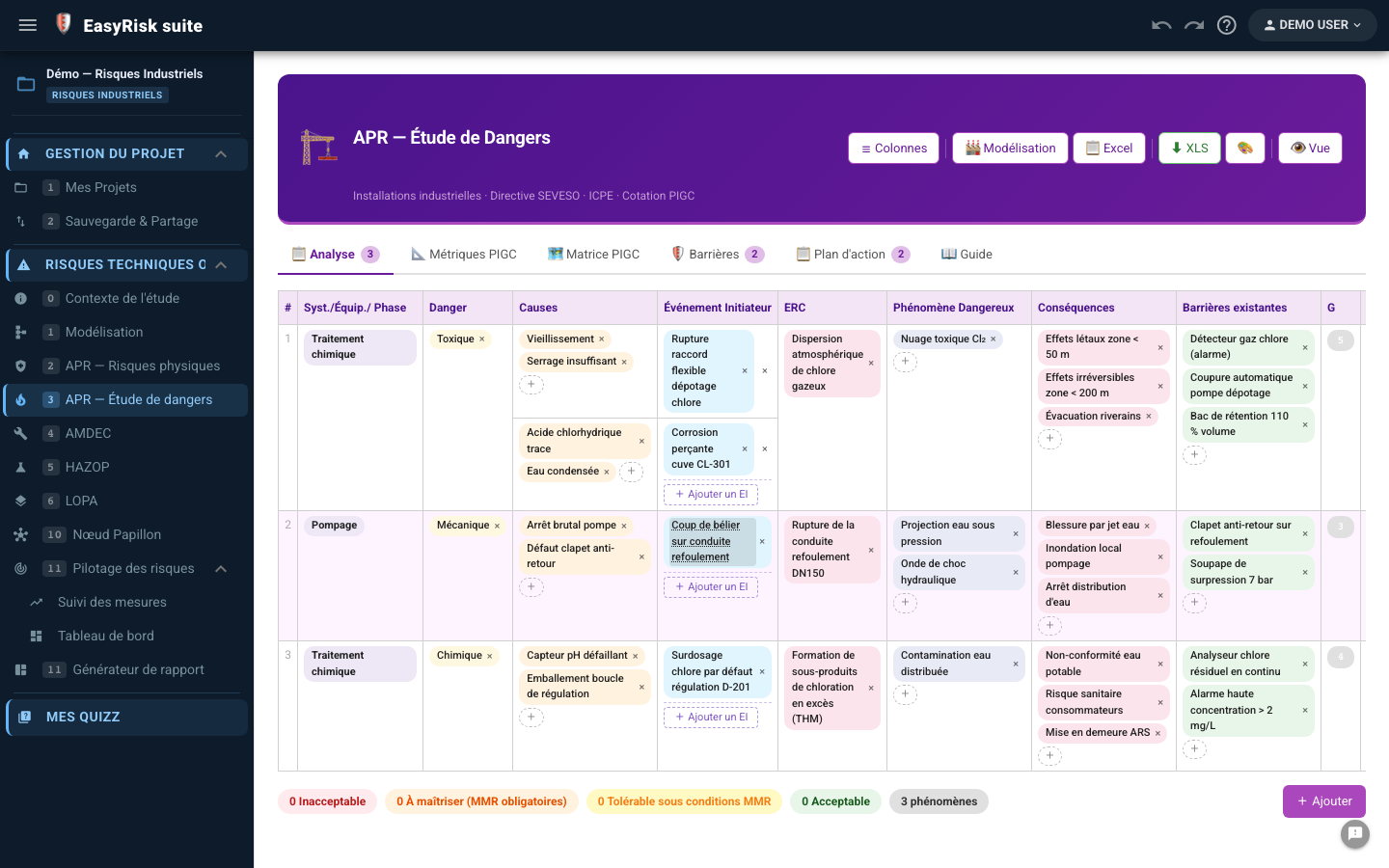
SEVESO / PIGC MMR passives / actives AI safety-report scenarios Export Word
SEVESO safety-report PHA—hazardous phenomena, passive/active risk-reduction measures, PIGC matrix
4

FMEA—Failure Modes, Effects and Criticality Analysis

Systematic analysis of component failure modes, with initial and residual RPN (S × O × D) calculation.

  • Three rating criteria Severity (S), Occurrence (O), and Detectability (D)—RPN = S × O × D, calculated automatically.
  • Components from the model Direct selection from the facility hierarchy—ensuring consistency.
  • Typical failure modes Failure-mode library by component type (valve, pump, sensor…).
  • Initial vs residual RPN Visualization of criticality reduction after corrective measures.
  • Sort by criticality Automatic ranking of the most critical components (maximum and average RPN).
  • AI generation AI suggests relevant failure modes by component type.
  • Built-in action plan Corrective measures linked to overall action tracking (In progress / Completed status).
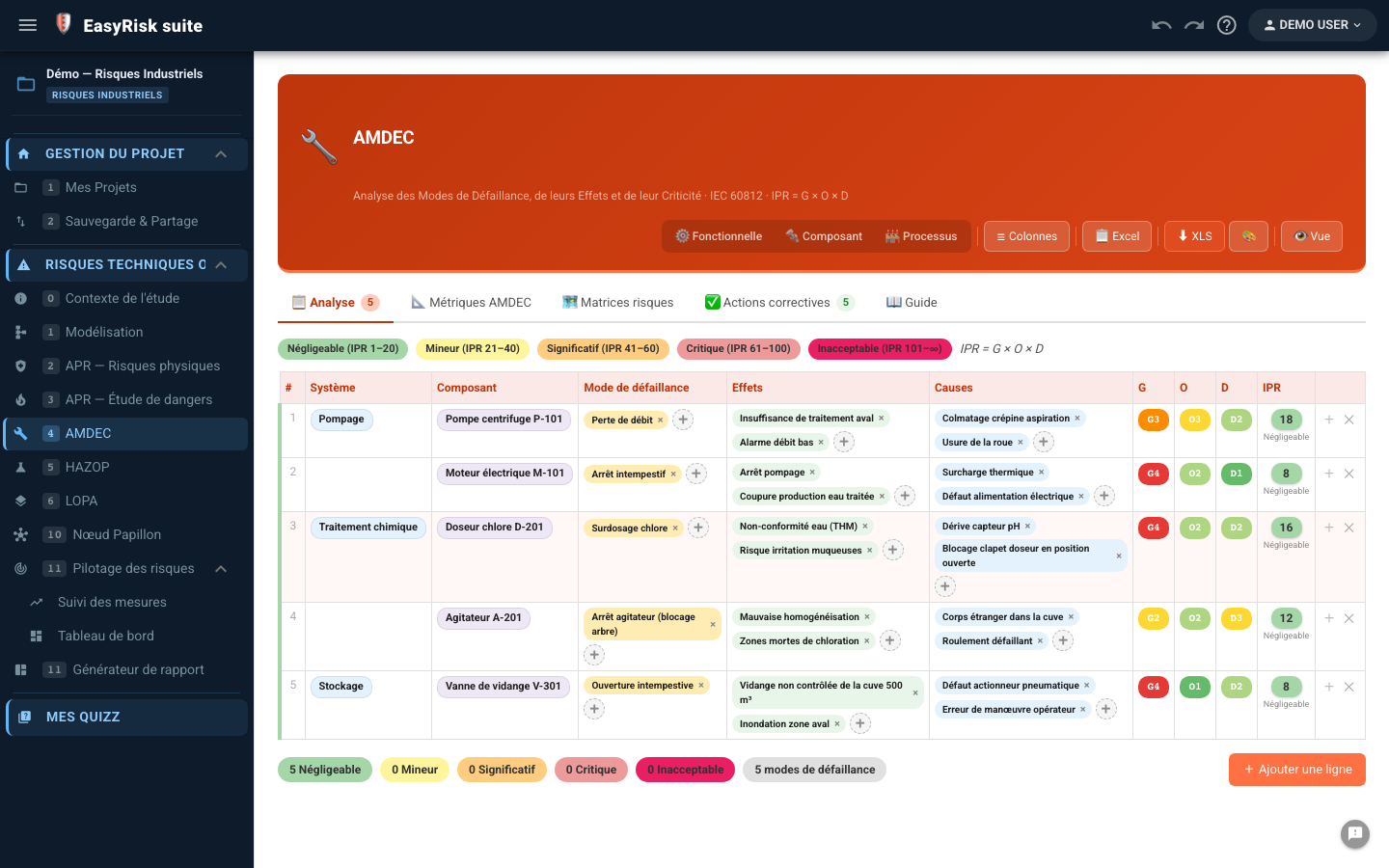
IPR = G × O × D AI failure modes Export Word + Excel
FMEA—failure-mode table, initial/residual S×O×D RPN, corrective measures
5

HAZOP — Hazard and Operability Study

Analysis of process-parameter deviations—guide words × parameters—with ratings and recommendations.

  • Node / parameter / guide-word structure Classic HAZOP organization—deviation = parameter + guide word (More, Less, No, Reverse…).
  • Variables from the model Process parameters (flow, pressure, temperature) come directly from the model.
  • Guide-word library Standard HAZOP plus configurable business-specific guide words.
  • Causes / Consequences / Existing safeguards Three structured columns for each deviation.
  • Cotation G/V + recommandations Recommendations prioritized according to deviation criticality.
  • AI generation AI suggests likely causes and consequences for each deviation.
  • Summary view by node Dashboard of critical deviations by HAZOP node.
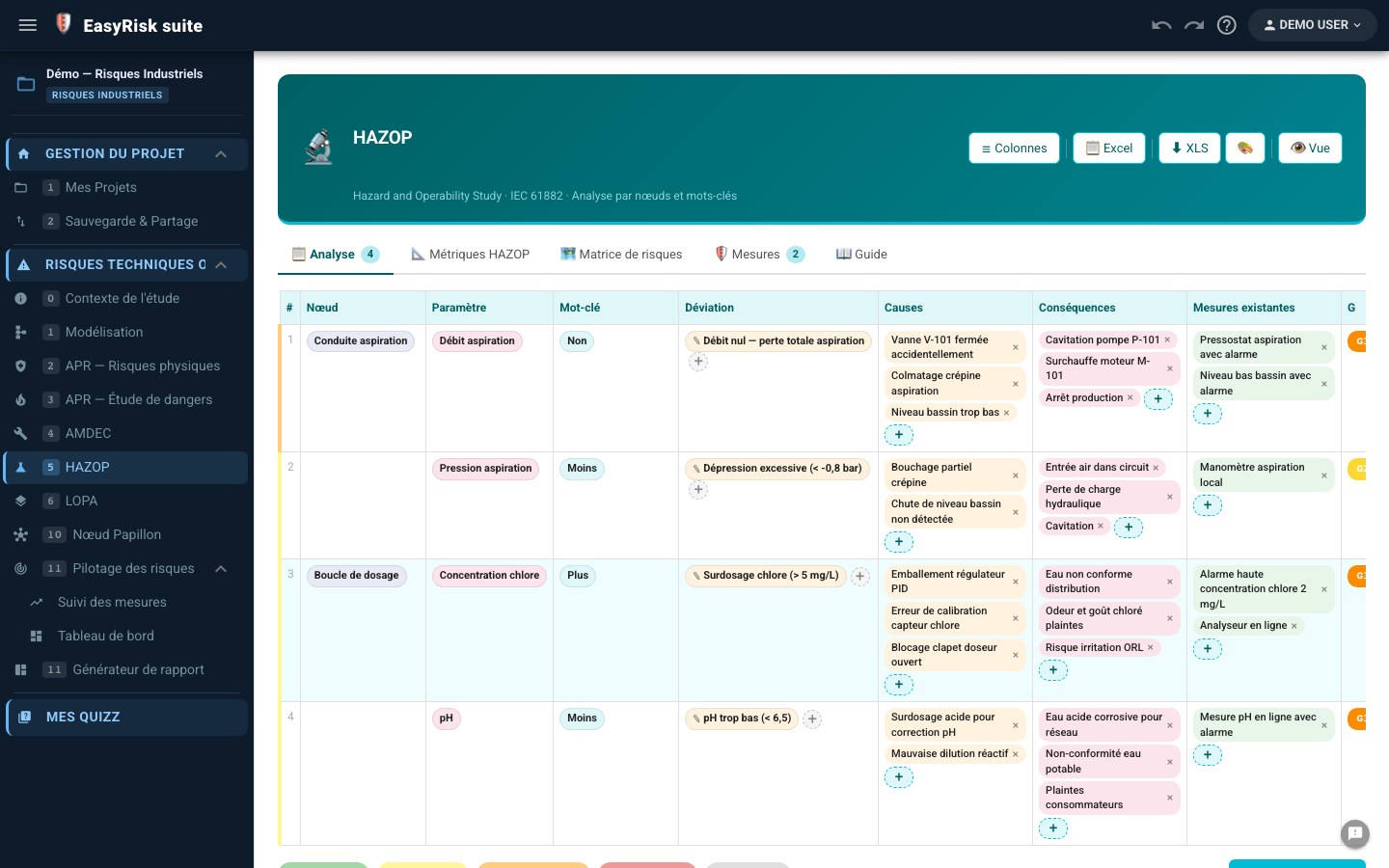
HAZOP guide words AI causes/consequences Export Word + Excel
HAZOP—parameter × guide-word deviation table, causes, consequences, recommendations
6

LOPA — Layer of Protection Analysis

Probabilistic quantification of risk scenarios—initiating frequency × IPL PFDs—SIL decision.

  • Structured LOPA scenarios Initiating event, initiating frequency, top event, consequence, and severity.
  • Protection layers (IPLs) Unlimited IPLs per scenario—each IPL has a type (SIS, BPCS, relief valve…) and a PFD.
  • Calcul automatique Resulting frequency = f_initiating × ∏ PFD(IPL)—compared with the tolerance threshold.
  • SIL decision Calculation of the required SIL if the target frequency is not achieved with existing IPLs.
  • Import depuis APR/EDD Safety-report PHA scenarios with active risk-reduction measures are offered for LOPA import.
  • Dedicated Excel export Complete LOPA table with formulas (exportLOPAXLS.js).
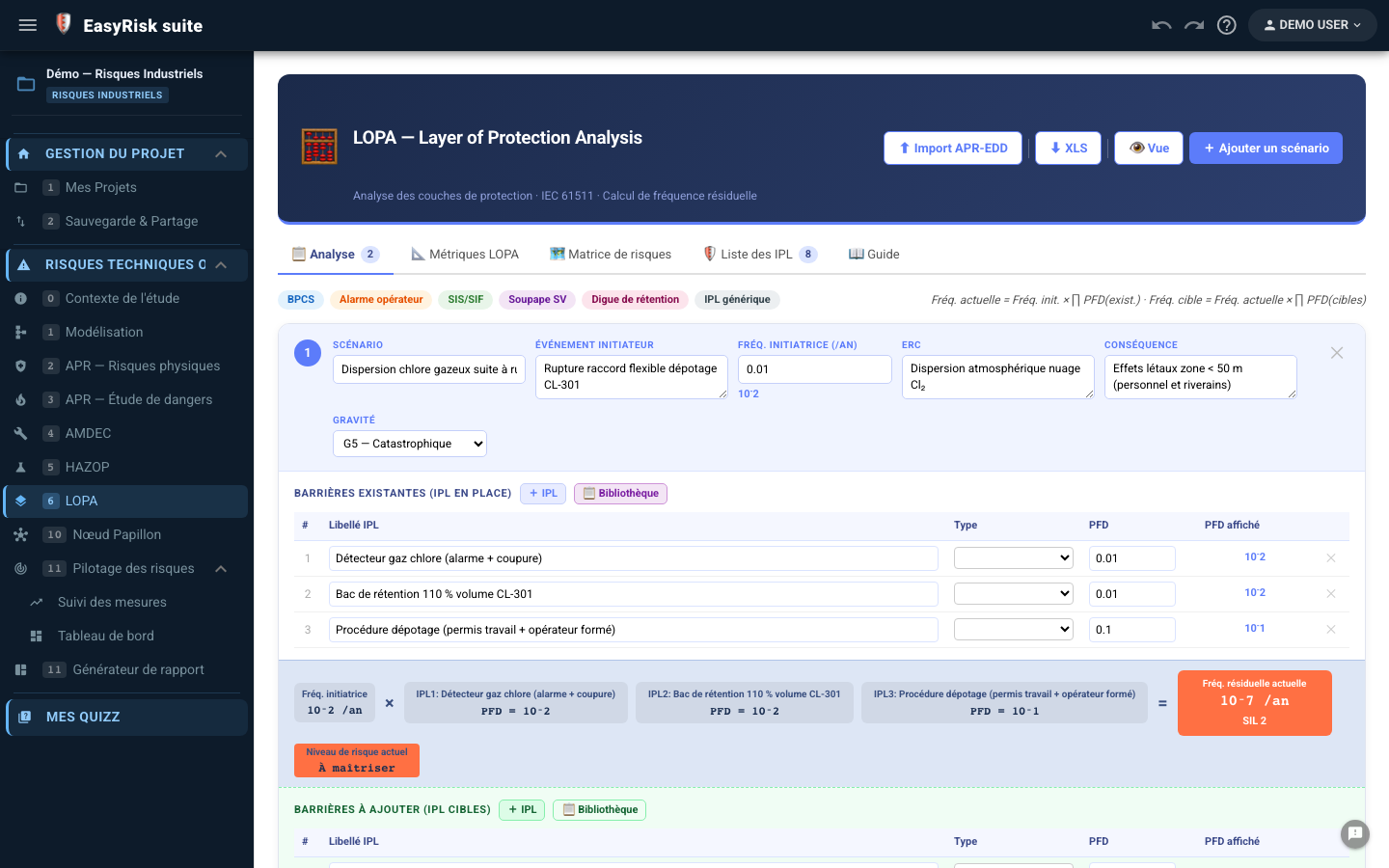
SIL / IEC 61511 IPL + PFD Export Excel
Lien SEVESO : LOPA scenarios requiring a SIL are included in the safety report's active risk-reduction measure summary.
LOPA—scenarios, IPL/PFD protection layers, resulting-frequency calculation, SIL decision

Bow-Tie—Simple and Advanced

Two modes for two uses: visual barrier communication or complete quantitative analysis with logic gates and minimal cut sets.

🦋

Mode Simple

Communication, sensibilisation, audits

  • Enveloppe papillon visuelle Clear graphical representation: causes on the left, top event in the center, and consequences on the right.
  • Cause / consequence barriers Visual positioning of prevention barriers (left) and protection barriers (right).
  • Direct editing on the diagram Add, move, or delete using drag-and-drop—with no forms.
  • Export SVG & Word Direct inclusion in the report or any external document.
  • Multi-diagrammes par projet One Simple diagram per top event—all managed in the same store.
Communication Audits Sensibilisation Export SVG
Simple Bow-Tie mode—bow-tie envelope, colored prevention/protection barriers
🔬

Advanced mode

Analyse quantitative, SIL, SEVESO

  • Portes logiques AND / OR Build the cause tree with gates—using the same logic as the fault tree.
  • Triggering conditions Aggravating or modifying factors (weather conditions, simultaneous operations…).
  • Quantification probabiliste PFD by barrier → top-event frequency calculated automatically through the palette.
  • Coupes minimales (MOCUS) Calculation and display of minimal cut sets—identifying critical failure combinations.
  • One-click PHA / safety-report import Imports causes, top event, and consequences from existing PHA/safety-report tables.
  • Built-in Word report export SVG diagram + barrier summary table + probabilities in the report.
Portes AND/OR MOCUS SEVESO / SIL Import APR/EDD
Advanced Bow-Tie mode—AND/OR gates, PFD quantification, MOCUS minimal cut sets
9

Fault Tree Analysis (FTA)

Graphical construction of the cause tree, top-event probability calculation, and minimal cut sets.

  • Graphical editor Drag-and-drop, AND/OR gates, and basic events—intuitive construction.
  • Automatic probability calculation Bottom-up propagation—top-event probability calculated in real time.
  • Coupes minimales Identification of minimal combinations of basic events that cause the top event.
  • Import from the model FMEA components and failure modes available for import.
  • SVG export + report Diagram embedded in the Word report with a minimal-cut-set table.
FTA / IEC 61025 Coupes minimales Export SVG + Word
Fault Tree—graphical editor, AND/OR gates, probability calculation, minimal cut sets

AI assistant—a decisive time-saver

Choose from eight engines (including Gemini, Claude, Mistral, Groq, or a model run locally with Ollama), configured by the user and built directly into every analysis page.

Step 1
Modelling Enter your facility once—systems, components, and variables
Step 2
Prompt IA In one click, AI analyzes your model and generates suggestions
Step 3
Validation The expert reviews, completes, and approves—the responsibility remains human
Step 4
Injection Approved scenarios are inserted into the table—zero re-entry

What the AI generates

⚠️
PHA scenarios (physical) Hazards, feared events, likely causes, and consequences—tailored to your actual components.
🏭
Safety-report PHA scenarios (SEVESO) Hazardous phenomena, top events, and suggested risk-reduction measures using regulatory terminology.
⚙️
FMEA failure modes By component type—typical modes with likely causes and effects, plus a suggested RPN rating.
🔬
HAZOP causes & consequences For each parameter/guide-word deviation, AI suggests sector-specific causes and consequences.
🏗️
Facility hierarchy Describe your facility in natural language—AI generates the system/component hierarchy.

Configuration & moteurs

🔵 Google Gemini
  • • Gemini 2.5 Pro / Flash
  • • Personal Gemini API key
  • • High volume, low cost
  • • Ideal for production
🟣 Claude (Anthropic)
  • • Claude Sonnet 4.6 / Opus 4.8 / Haiku 4.5
  • • Personal Anthropic API key
  • • High reasoning quality
  • • Ideal for SEVESO/SIL
🟠 Mistral AI / Groq
  • • European (GDPR) or ultra-fast models
  • • Personal API key
  • • Alternatives to Gemini/Claude
🖥️ Ollama (local)
  • • Model run on your workstation
  • • No API key and no outbound data
  • • Suitable for isolated/critical-infrastructure environments

Hugging Face, OpenRouter, and a custom OpenAI-compatible provider are also available in advanced settings.

Data sovereignty: AI is called directly from your browser using your own API key (or no key for local Ollama). No data passes through our servers. You retain full control of your study data.
AI Assistant—PHA scenario generation from the model, validation, and insertion

Word reports & Excel exports in one click

The Word report is generated entirely from your data—with no copy-and-paste or manual formatting.

📄

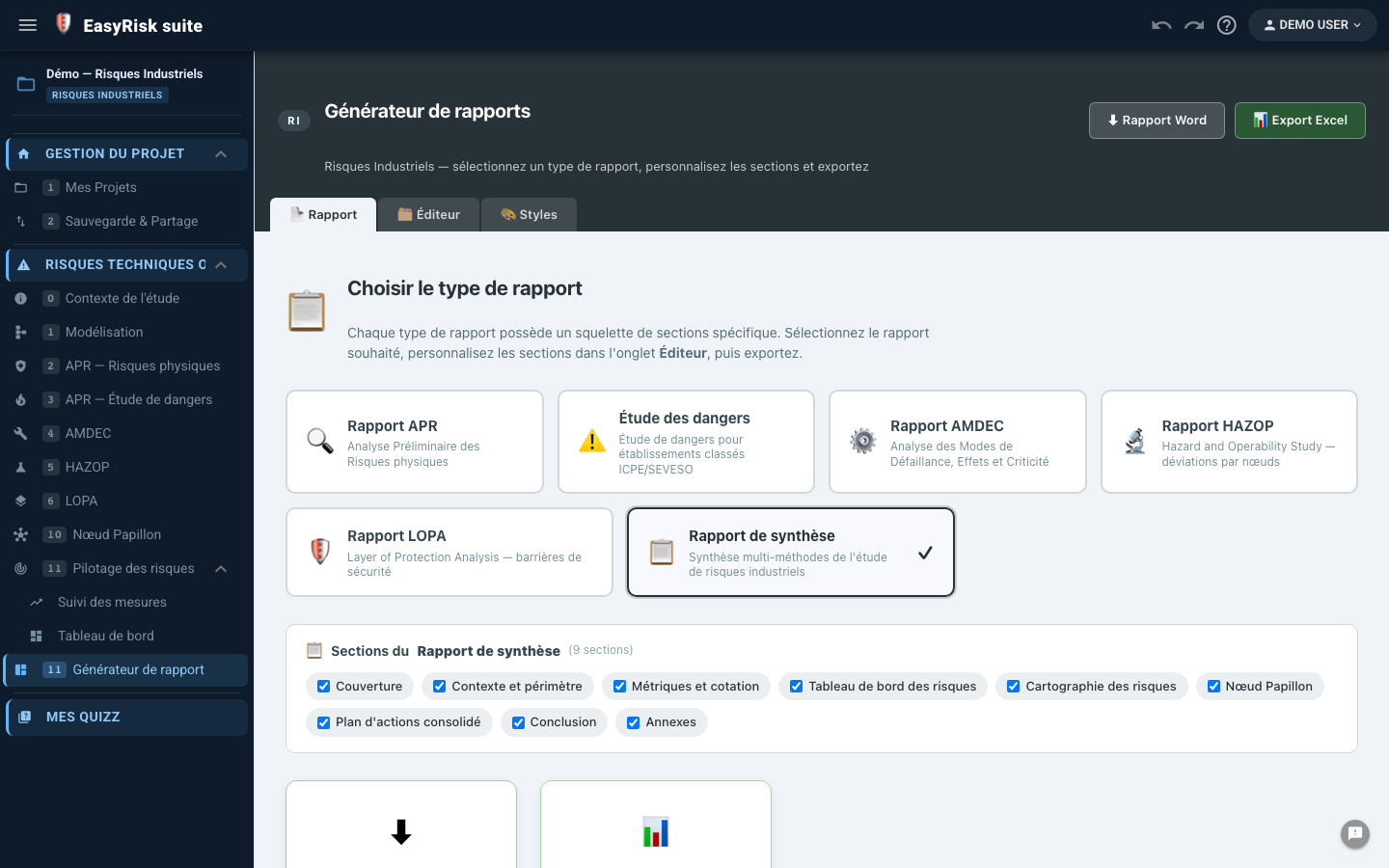
Industrial Risk report generator

Six configurable report types

  • PHA report — Context, scenario table, and initial/residual risk matrix
  • Safety Report — SEVESO safety-report compliant, hazardous phenomena, and risk-reduction measures
  • FMEA report — Tableau IPR, mesures correctives, plan d'actions
  • HAZOP report — Deviation table and ranked recommendations
  • LOPA report — Scenarios, IPLs, frequencies, and SIL decisions
  • Overall summary — All results in one document
Editable Markdown sections: Each report section contains Markdown text that you can customize using tokens {variable} —values are calculated automatically from your data.
📊

Exports Excel & SVG

Immediately usable data

📋
PHA Scenario table + matrix
📊
LOPA Excel Built-in PFD formulas
⚙️
FMEA RPN table with filters
🏭
Modelling Arborescence installation
🦋
BowTie SVG Diagrammes vectoriels
🌲
FTA SVG Fault tree
📈
Risk matrix High-resolution SVG
✅
Plan d'actions Action plan across all methods
Industrial Risk report generator—Report, Markdown Editor, and Word Styles tabs

Tokens available in the Word report

Scalaires
{titreEtude}
{organisme}
{responsable}
{nbScenariosAPR}
{nbAPR-Critique}
{iprMax}
{nbDiagrammesNP}
Tableaux APR
{TABLE-APR}
{TABLE-APR-EDD}
{RISK-MATRIX}
{INITIAL-PHA-RISK-MATRIX}
{TABLE-ACTIONS}
Method tables
{TABLE-AMDEC}
{TABLE-HAZOP}
{TABLE-LOPA}
{TABLE-BOWTIE-SYNTHESE}
{TABLE-BOWTIE-BARRIERES}
Repeated blocks
{SECTION-BOWTIE-ALL}
{TABLE-BOWTIE-PROBAS}
{SECTION-xxx}
(1 bloc Word par diagramme)

Estimated time savings by task

Comparison with a conventional workflow (Excel + manual Word reports + engineering consultancy).

Reduced data-entry time

PHA scenario entry (20 scenarios)−70%
FMEA failure modes (50 components)−65%
HAZOP deviations (10 nodes)−60%
Final Word report−90%
Update after review−80%
Bow-Tie diagram−75%

Before / After Polyodos

✗ Sans Polyodos

  • Multiple unlinked Excel files
  • Data re-entry between methods
  • Manually formatted Word report
  • Bow-Tie in Visio/PowerPoint
  • Reviews by email / file sharing
  • Aucune assistance IA
  • No change traceability
  • Risk of inconsistencies between versions

✓ With Polyodos IR

  • One database for all methods
  • Data shared automatically
  • Report generated in one click
  • Built-in Bow-Tie—one-click PHA import
  • Real-time multi-user collaboration
  • AI generates scenarios for validation
  • Undo/Redo + historique complet
  • Single source of truth

Built-in training module

Assess and strengthen your teams' risk culture without an external tool—regulatory quizzes, trainer mode, and individual tracking.

1
Quiz library Questions organized by method (PHA, FMEA, HAZOP, LOPA, Bow-Tie, SEVESO regulations)—beginner / intermediate / expert levels.
2
Player interactif Multiple-choice and open questions—immediate feedback with a regulatory explanation. Optional timer.
3
Mode formateur Display questions in the room, control the pace, and show answers after discussion.
4
Progress tracking Score by session, history by user, and gap identification—on the group server.
5
Bloquage par route Optional configuration: access to analyses requires a minimum training score.
QCM + questions ouvertes Mode formateur Suivi individuel SEVESO / IEC 61511
Quiz Module—interactive player, Industrial Risk/PHA regulatory questions, feedback, and score

Real-time collaboration & multi-project management

Several experts can work on the same project simultaneously—with no version conflicts and precise access control.

⚡

Real-time sync

Bidirectional PouchDB sync with the server—every change is instantly visible to all connected collaborators.

Live sync Offline-first
👥

Roles & permissions

The project owner invites collaborators with read or write access. Groups share standard scenario libraries.

Owner / Editor / Reader Groupes
🏛️

Shared libraries

Standard scenarios, standard failure modes, and approved barriers—shared across the group or organization.

Group libraries Business standards
☁️

Offline-first

The application works offline (local PouchDB). Synchronization resumes automatically when the connection returns—no data is lost.

Sans WiFi Terrain
🔒

Security & sovereignty

Data hosted on your dedicated server (OVH VPS) or on premises. JWT, TLS encryption, and automatic Duplicati → OVH S3 backups.

On-premise possible JWT Backup S3
📱

EBIOS RM, IEC 62443, Industrial Risk

Three methodologies on one codebase, united under Polyodos—the safety/security bridge between cyber and industry is possible because these modules share the same product.

polyodos.com
🚀

Architecture technique

Frontend
  • Vue 3 + Composition API
  • Quasar 2 (PWA/SPA)
  • Pinia (persistent state)
  • Vite (build)
Database
  • PouchDB (client offline)
  • PouchDB-Server (Node.js)
  • Sync bidirectionnel live
  • 1 base par projet
Polyodos Server
  • Node.js + Express
  • JWT + secure cookies
  • Docker + Nginx Proxy
  • Monitoring Uptime Kuma
Exports
  • Word (DOCX—client-side)
  • Excel (ExcelJS)
  • Native SVG (no dependency)
  • PDF via impression navigateur

Standard scenario and data libraries

Build on past studies—approved scenarios, standard failure modes, and proven barriers—shared across your organization.

12

Industrial Risk libraries

Scenario, failure-mode, and barrier reference data shared across projects and groups.

  • PHA / safety-report scenario library Standard scenarios by sector (chemicals, petrochemicals, ATEX, utilities)—importable into any project in one click.
  • FMEA failure modes Catalog of modes by component type (valve, pump, sensor, heat exchanger…)—approved by your experts.
  • Standard Bow-Tie barriers Library of prevention and protection barriers with reference PFDs.
  • Personal libraries Each user can build their own library of favorite scenarios.
  • Group libraries Shared among all group members—updates propagate instantly.
  • Import/export JSON Full library portability between Polyodos instances.
Group libraries Standard scenarios AMDEC + BowTie Import 1 clic
Industrial Risk libraries—standard scenarios, failure modes, Bow-Tie barriers, group import

FR