EBIOS Risk Manager · Technical Overview

Take control of your cyber risks
the ANSSI method, assisted by AI

Polyodos EBIOS fully covers the five EBIOS Risk Manager workshops—from identifying essential assets to the risk-treatment roadmap—in a collaborative, AI-assisted tool.

Conforme ANSSI Offline-first Export Word & Excel Built-in generative AI
5
Ateliers EBIOS
ANSSI
Official method
IA
Scenario generation
1-clic
Word report
A1→A5
Flux complet

An integrated tool, from scoping to reporting

Every step of an EBIOS Risk Manager analysis in one linear workflow, with no data re-entry between workshops.

📋

Cadrage & contexte

Organization, scope, regulations, and project team.

💎

Essential assets

Identification and assessment of supporting and essential assets.

🎯

Risk sources

Mapping of stakeholders and risk sources.

🗺️

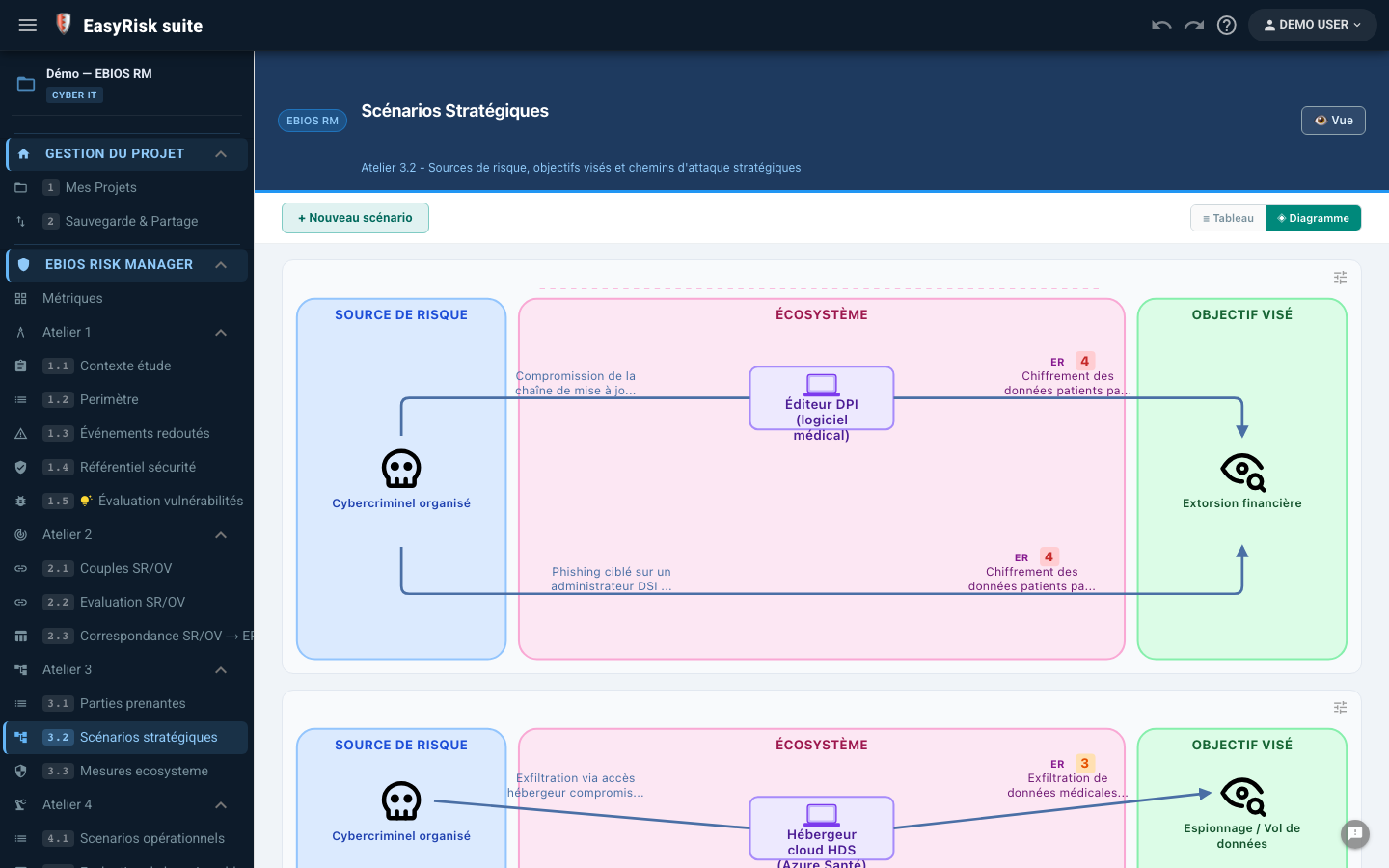
Strategic scenarios

Chemins d'attaque, couples SR/BE, cotation vraisemblance.

⚙️

Operational scenarios

Detailed attack methods and attack sequences.

🛡️

Risk treatment

Security measures, treatment plan, and residual risks.

📊

Pilotage

Measure tracking, indicators, and dashboard.

📄

Automatic Word report

Complete EBIOS report in one click.


From scoping to the roadmap

Each workshop builds on the previous one's results. Data flows automatically—no re-entry required.

A1

Scope and security baseline

Definition of the study scope, initial identification of feared events, and applicable security baseline.

  • Study identification Title, organization, reference, version, and dates.
  • Functional and technical scope Description of the boundaries of the subject of the study.
  • High-level feared events (FEs) Initial identification of FEs before the workshops.
  • Biens supports List of the digital and physical components of the subject of the study.
  • Security values Confidentiality, Integrity, Availability, and Traceability.
  • Security baseline Applicable regulatory requirements and good practices.
  • EBIOS team composition Included on the report cover page.
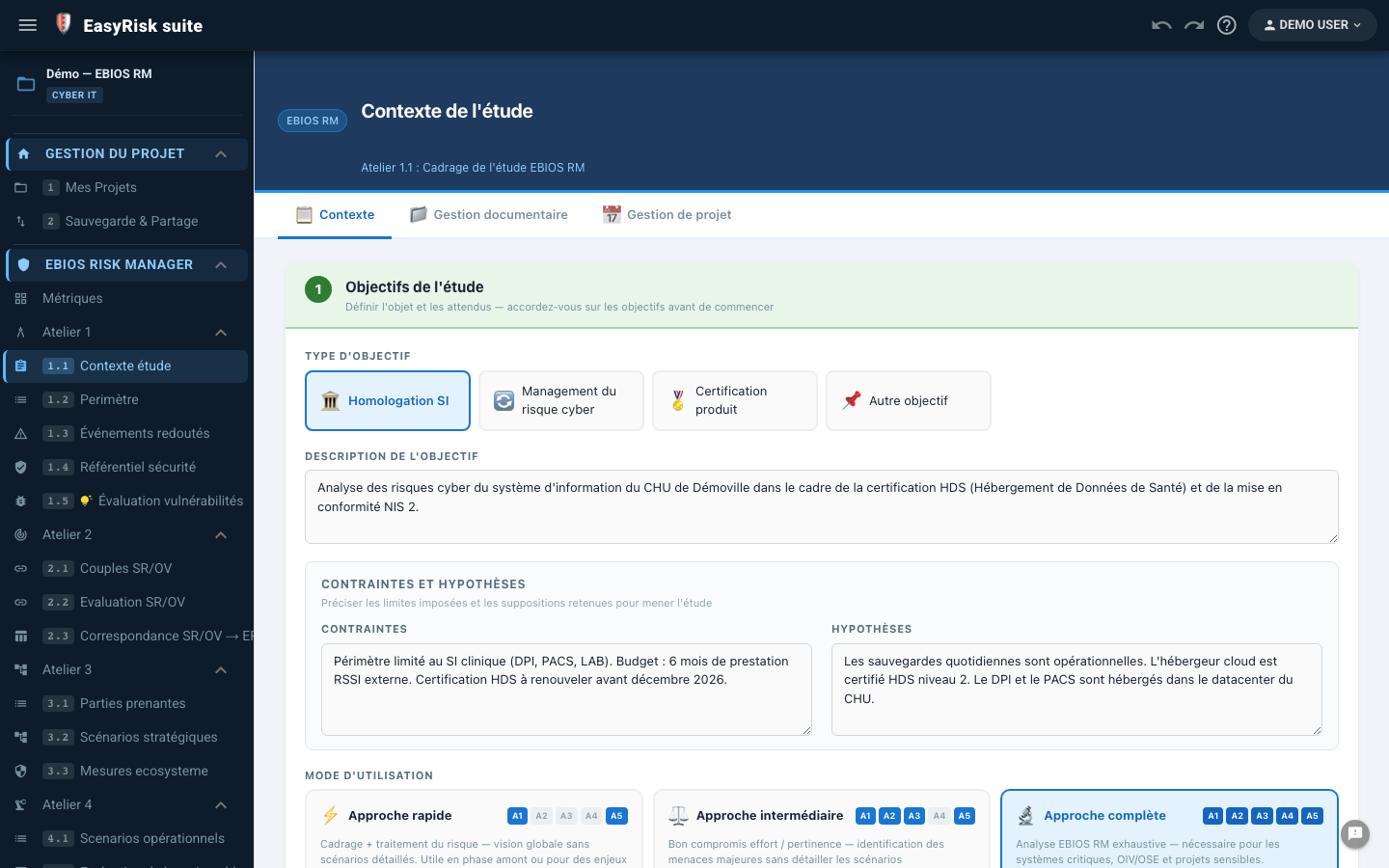
ANSSI Subject of the study Biens supports DICP
W1—Scoping and security baseline: study form, scope, supporting assets
A2

Essential assets

Identification and assessment of business processes and critical information using the CIAT criteria.

  • Identification of essential assets The organization's business processes and critical information.
  • Valorisation DICP Availability, Integrity, Confidentiality, and Traceability—for each essential asset.
  • Feared events (FEs) FEs associated with each essential asset, including severity level.
  • Impact severity level Configurable 1–4 scale.
  • Liens biens essentiels ↔ biens supports Dependencies calculated automatically.
  • Dependency mapping Vue graphique biens essentiels / biens supports.
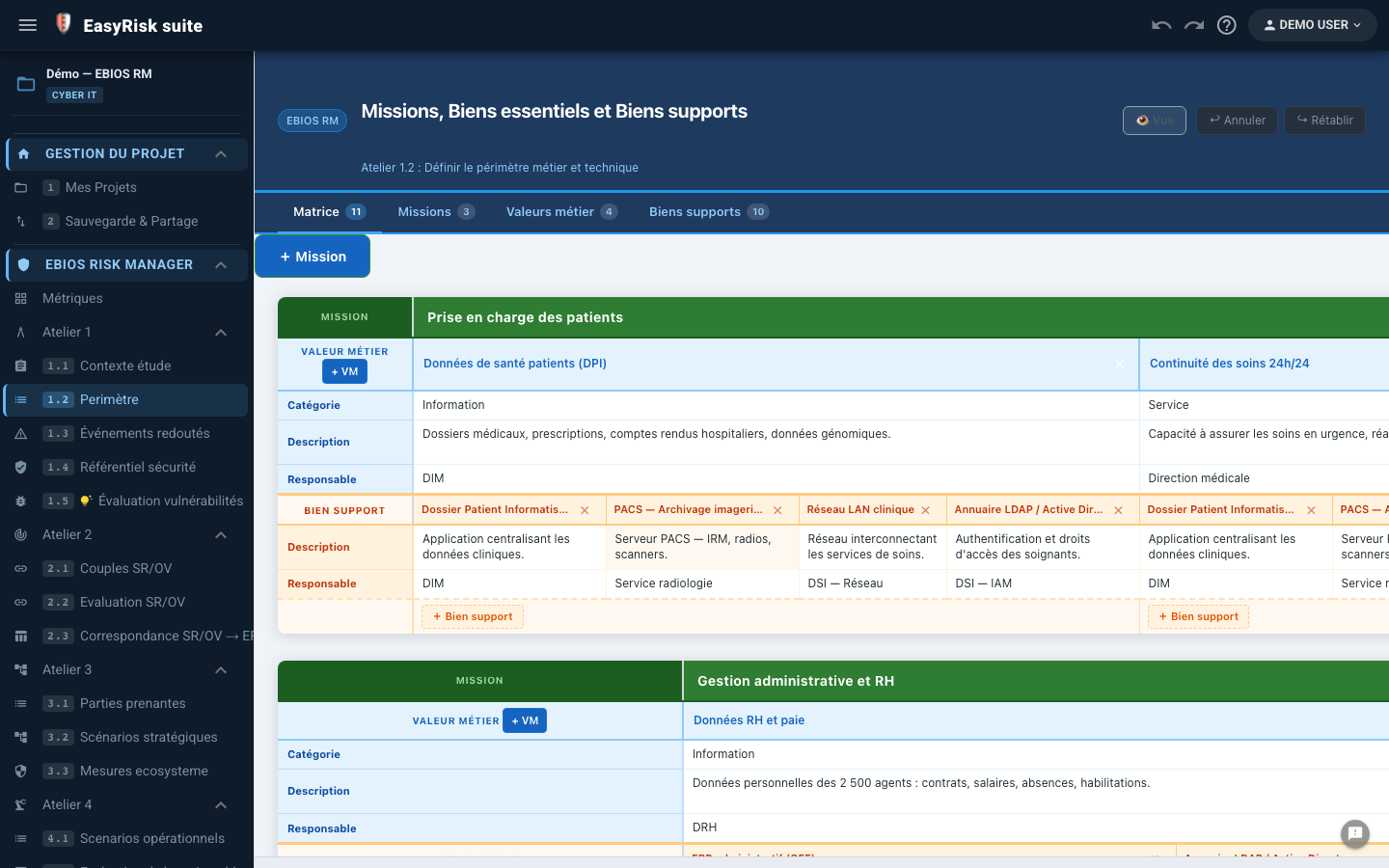
DICP Feared events Valorisation Cartographie
W2—Essential assets: CIAT assessment, feared events, mapping
A3

Strategic scenarios

Risk sources, RS/TO pairs, strategic attack paths, and likelihood ratings.

  • Risk sources (RS) Nation states, cybercriminals, insiders, hacktivists…
  • RS / Target Objective (TO) pairs RS × TO relevance matrix.
  • Strategic attack paths RS → EA path with intermediate milestones.
  • Cotation vraisemblance 1–4 scale for each strategic scenario.
  • Strategic-scenario graph SVG visualization of attack paths.
  • AI: attack-path generation Suggests plausible paths for validation from the RS/EA map.
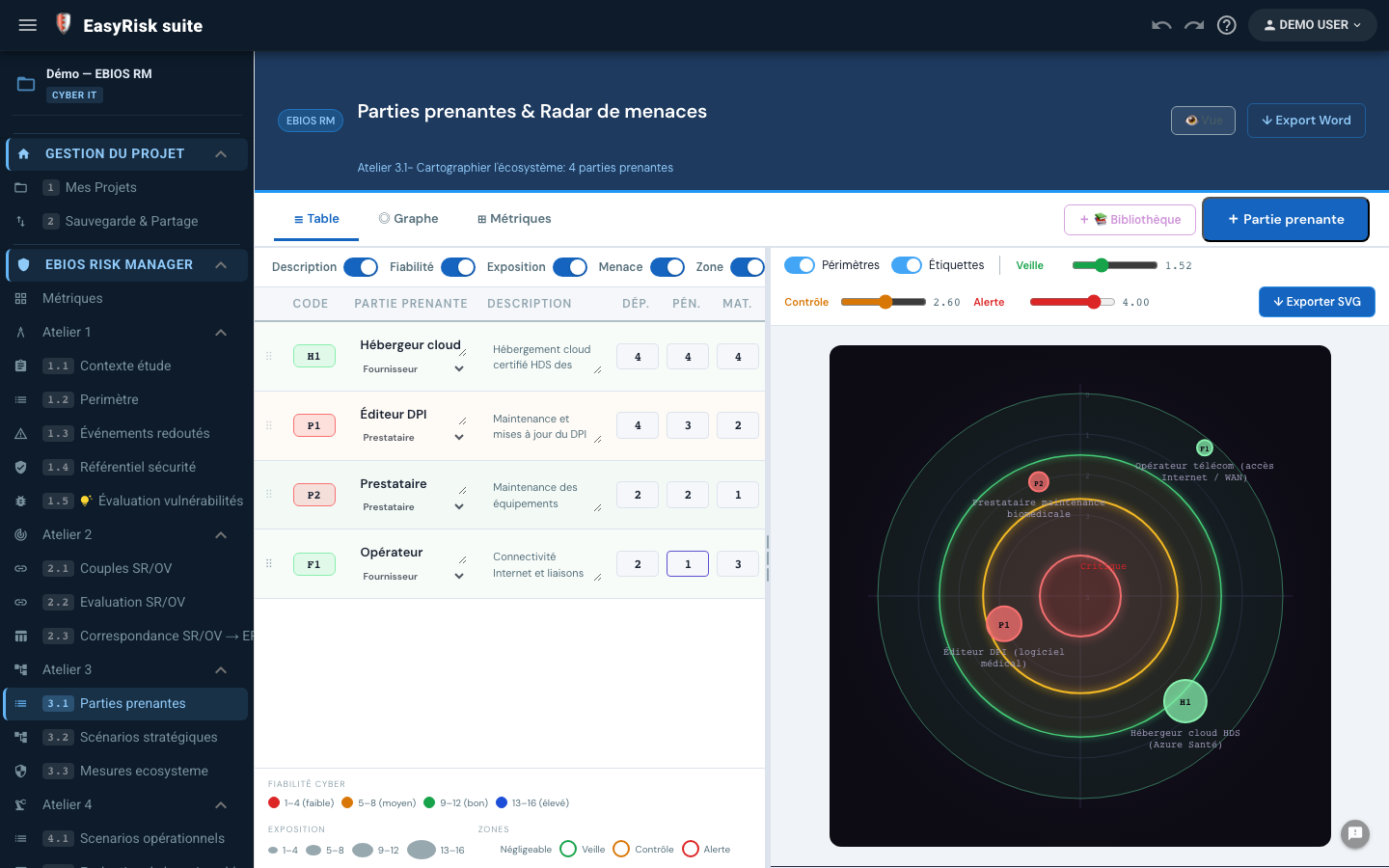
Risk sources Couples SR/OV Chemins d'attaque IA chemins
W3—Stakeholders: threat radar, exposure, cyber reliability W3—Strategic scenarios: RS → ecosystem → TO attack-path diagram
A4

Operational scenarios

Detailed attack methods, attack sequences targeting supporting assets, and operational likelihood ratings.

  • Attack methods (AMs) One or more AMs per strategic scenario.
  • Detailed attack sequences Successive steps targeting supporting assets.
  • Operational likelihood rating 1–4 scale for each attack method.
  • Automatic AM ↔ strategic-scenario link Guaranteed W3 → W4 traceability.
  • AI: suggested attack methods By type of supporting asset targeted.
  • Summary view RS → EA → AM coverage—completeness dashboard.
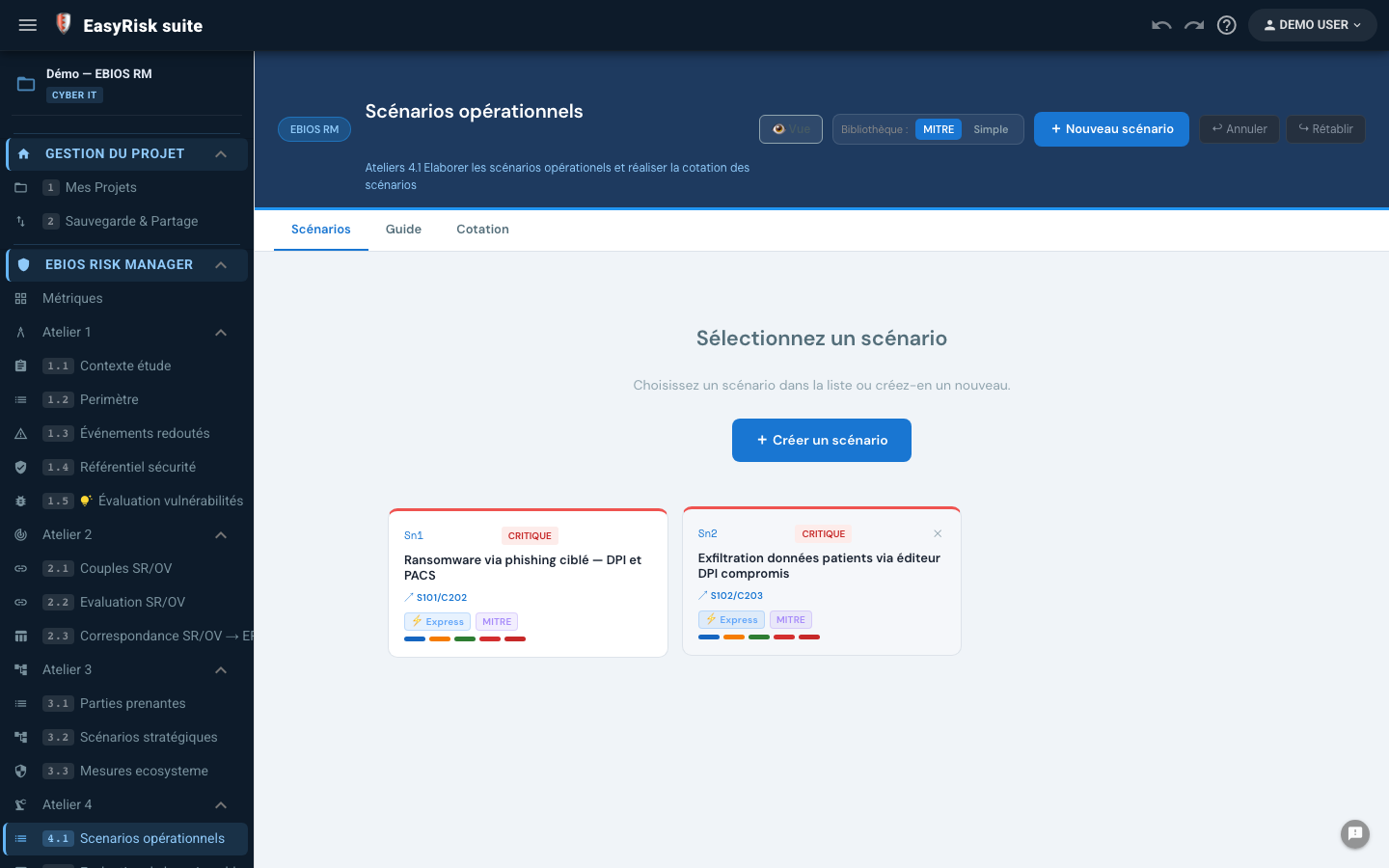
Attack methods Attack sequences AI scenarios Couverture
W4—Operational scenarios: attack methods, attack sequences
A5

Risk treatment

Security measures, treatment options, treatment plan, and exportable roadmap.

  • Suggested security measures For each residual scenario—tailored to your assets and attack methods.
  • Four treatment options Reduction, Transfer, Avoidance, and Acceptance.
  • Treatment plan Owners, deadlines, and status—built-in tracking.
  • Residual risks after treatment Automatic reassessment of likelihood and severity.
  • AI: suggested measures Measures tailored to the context and residual scenarios.
  • Exportable roadmap Word + Excel—ready for executive-committee presentation.
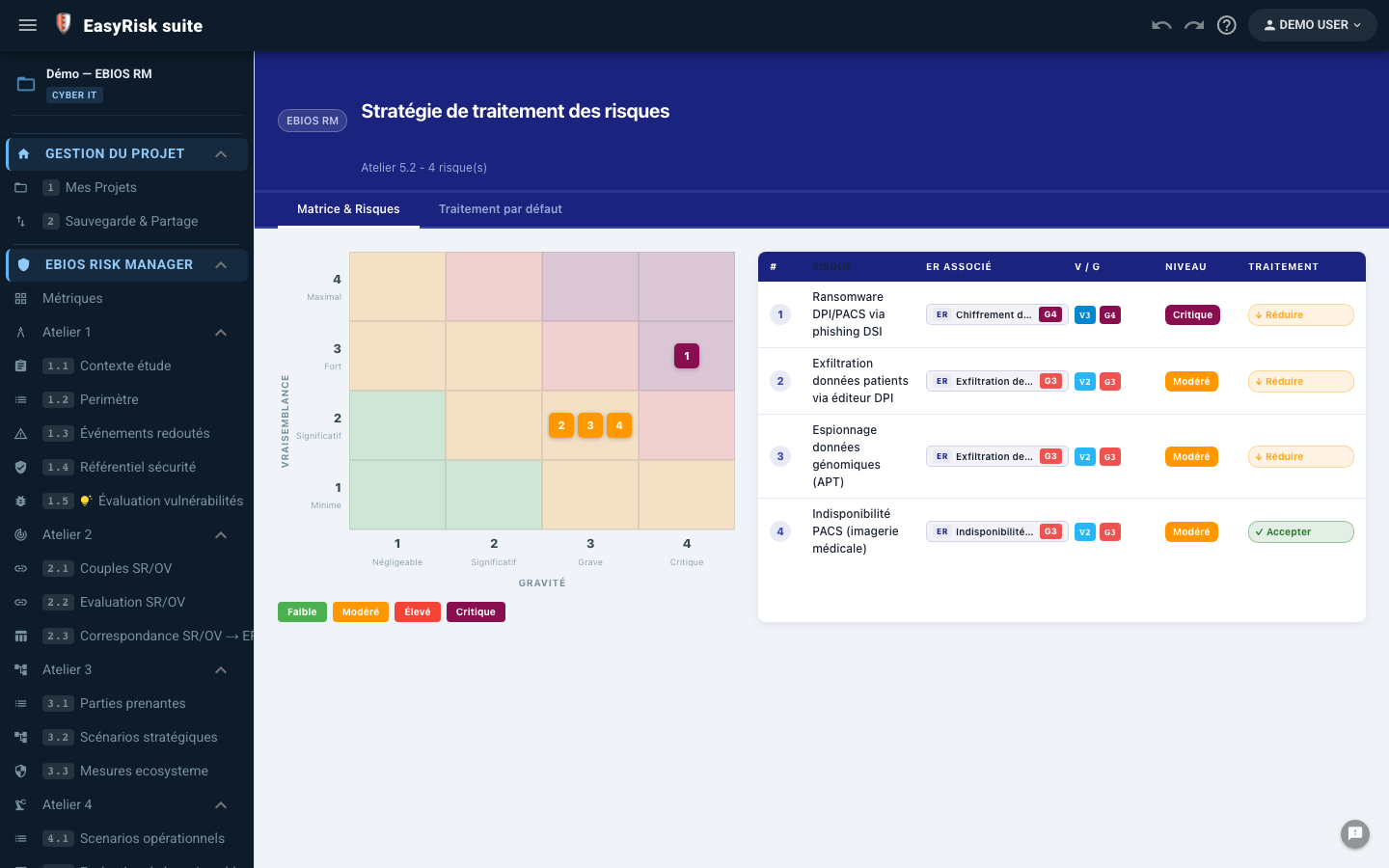
Treatment plan Residual risks IA mesures Roadmap
W5—Risk treatment: plan, measures, residual risks
6

Pilotage

Measure dashboard, coverage indicators, and tracking of deadlines and owners.

  • Measure dashboard In progress / Completed / Overdue—summary view.
  • Residual-risk coverage indicators Treatment rate by risk level.
  • Deadline and owner tracking Visual overdue alerts.
  • Vue globale Treated vs accepted vs ongoing risks—at a glance.
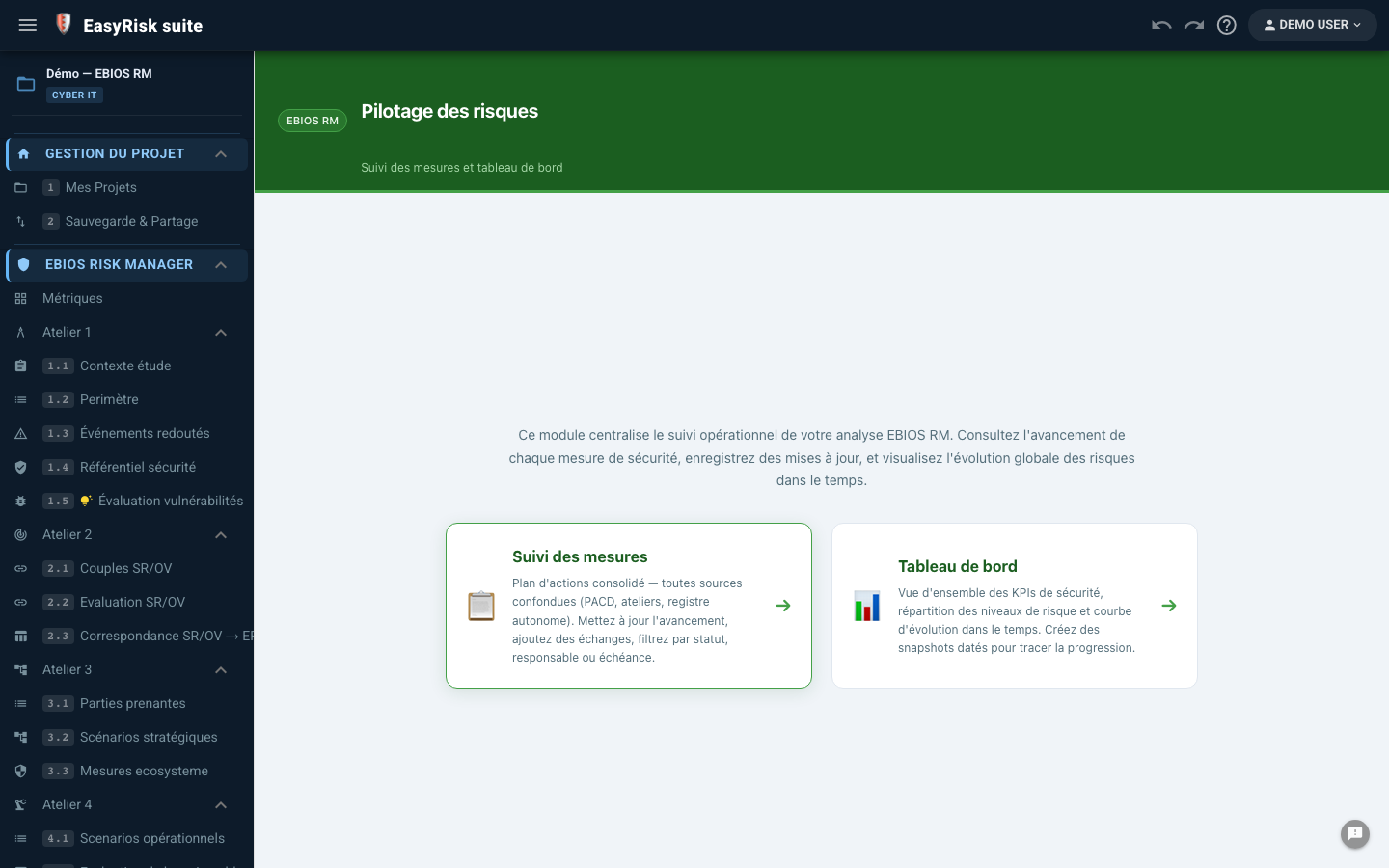
Dashboard Suivi mesures KPIs
Pilotage EBIOS — tableau de bord mesures, indicateurs
7

Word report

Complete EBIOS RM report generated in one click—with configurable sections, customizable styles, and Excel export.

  • Complete EBIOS RM report in one click Every section is generated from your data.
  • Sections couvertes Scoping, assets, strategic and operational scenarios, treatment, and appendices.
  • Styles Word configurables Customizable fonts, colors, header, and footer.
  • Export Excel Matrices, scenario tables, and treatment plan.
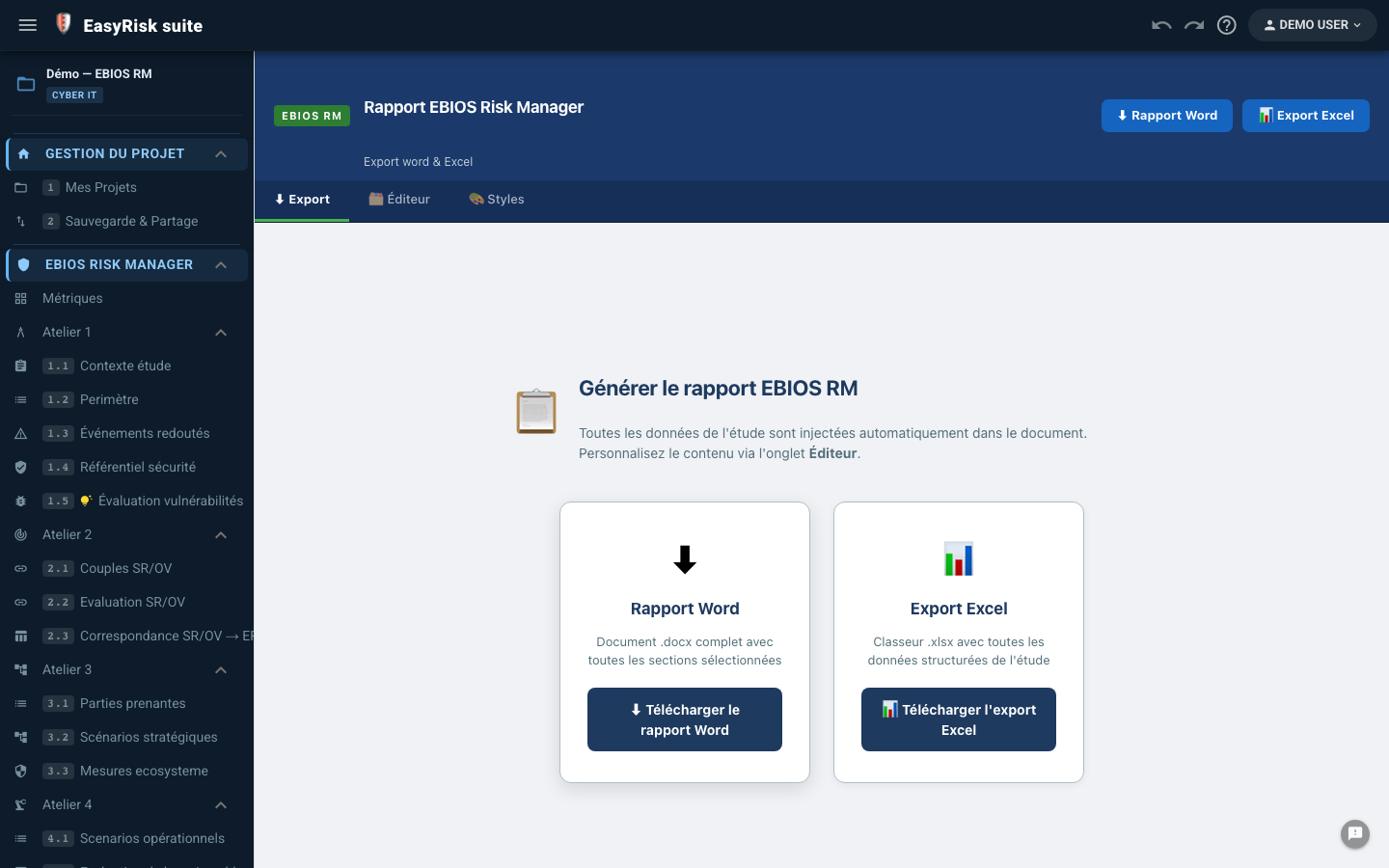
Export Word Export Excel Styles configurables
EBIOS RM Word report generated in one click

Real-time collaborative work

Several CISO experts can work on the same project simultaneously—with no version conflicts and precise access control.

  • ⚡
    Sync PouchDB bidirectionnel Changes are instantly visible to every connected collaborator.
  • 👥
    Invite collaborators Editor / reader roles—fine-grained access rights for each project.
  • ↩️
    Change history (undo/redo) Complete traceability—changes can be undone by user.
  • 🏛️
    Shared scenario libraries Standard scenarios, risk sources, and approved measures—shared across group projects.
  • ☁️
    Mode offline-first Works offline. Synchronization resumes automatically when the connection returns.
Live sync Owner / Editor / Reader Offline-first Group libraries
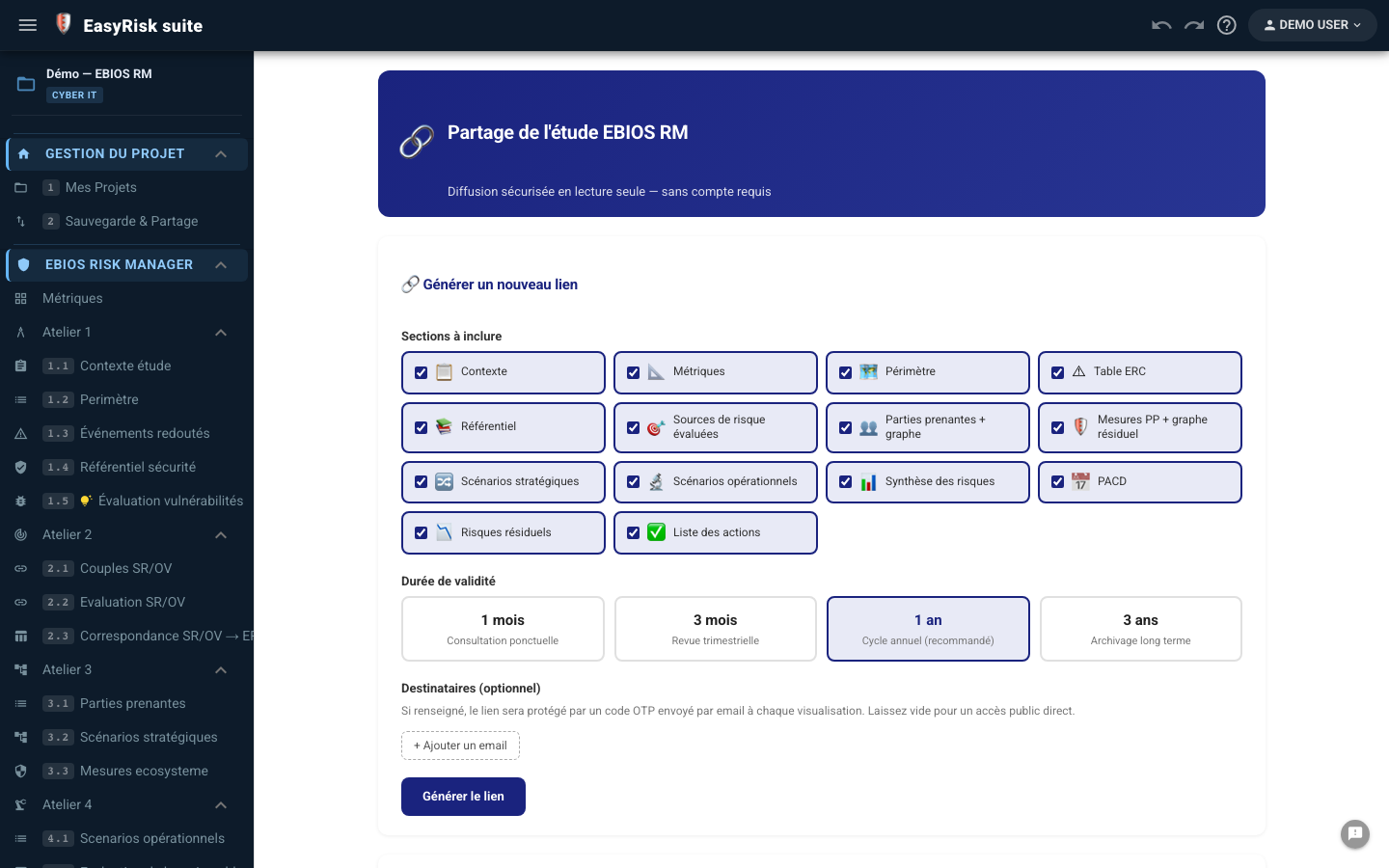
EBIOS collaboration and sharing—real-time sync, collaborator invitations

AI assistant—a decisive time-saver

Choose from eight engines (including Gemini, Claude, Mistral, Groq, or a model run locally with Ollama), configured by the user and built directly into every workshop.

Step 1
Cadrage Describe your organization, scope, and essential assets once
Step 2
Prompt IA In one click, AI analyzes your context and generates suggestions
Step 3
Validation The CISO reviews, completes, and approves—the responsibility remains human
Step 4
Injection Approved scenarios are inserted into the workshop—zero re-entry

What the AI generates

🗺️
Chemins d'attaque (A3) Suggests plausible, context-specific attack paths from the RS/EA map.
⚙️
Attack methods (W4) Detailed attack sequences by type of supporting asset targeted.
🛡️
Security measures (W5) Measures tailored to the context, residual scenarios, and essential assets concerned.
📋
Cadrage initial Suggests a list of essential and supporting assets based on the organization description.

Configuration & moteurs

🔵 Google Gemini
  • • Gemini 2.5 Pro / Flash
  • • Personal Gemini API key
  • • High volume, low cost
  • • Ideal for production
🟣 Claude (Anthropic)
  • • Claude Sonnet 4.6 / Opus 4.8 / Haiku 4.5
  • • Personal Anthropic API key
  • • High reasoning quality
  • • Ideal for advanced EBIOS analyses
🟠 Mistral AI / Groq
  • • European (GDPR) or ultra-fast models
  • • Personal API key
  • • Alternatives to Gemini/Claude
🖥️ Ollama (local)
  • • Model run on your workstation
  • • No API key and no outbound data
  • • Suitable for the most sensitive studies

Hugging Face, OpenRouter, and a custom OpenAI-compatible provider are also available in advanced settings.

Data sovereignty: AI is called directly from your browser using your own API key (or no key for local Ollama). No data passes through our servers. You retain full control of your EBIOS analysis data.

Word report and Excel exports in one click

The EBIOS RM report is generated entirely from your data—with no copy-and-paste or manual formatting.

📄

Complete EBIOS RM report

All workshops in one document

  • Cover page — Title, organization, owner, team, version, and dates
  • Scoping & scope — Subject of the study, supporting assets, and security baseline
  • Essential assets — CIAT table, feared events, and mapping
  • Strategic scenarios — Risk sources, RS/TO pairs, and attack paths
  • Operational scenarios — Attack methods and attack sequences
  • Risk treatment — Treatment plan, residual risks, and roadmap
  • Annexes — Matrices, glossary, and regulatory references
Editable Markdown sections: Each section contains customizable Markdown text with tokens {variable} —values are calculated automatically from your EBIOS workshops.
📊

Exports Excel & formats

Immediately usable data

💎
Essential assets Tableau DICP + ER
🗺️
Strategic scenarios Tableau SR/OV + vraisemblance
⚙️
Operational scenarios Attack methods
🛡️
Treatment plan Mesures + responsables
📈
Risk matrix High-resolution SVG
🌐
Scenario graph SVG natif
Tokens Word disponibles
{titreEtude}
{organisme}
{responsable}
{nbBiensEssentiels}
{nbScenariosStrategiques}
{TABLE-BIENS-ESSENTIELS}
{TABLE-SCENARIOS-STRAT}
{TABLE-PLAN-TRAITEMENT}
{EBIOS-RISK-MATRIX}
{SECTION-TRAITEMENT}

FR